

What is Paypal?
PayPal is an online payment system that’s been around since 1998, PayPal is a service that enables you to pay, send money, and accept payments. from anywhere in the world for a small fee or no fee at all if the money is going to or coming from a friend or family member in the US. PayPal uses data encryption and anti-fraud technology.
PayPal Holdings, Inc. is an American company operating a worldwide online payments system that supports online money transfers and serves as an electronic alternative to traditional paper methods like checks and money orders.
also read Make Money Online with Payoneer Bonus,Earn 25 USD when you refer friends to Payoneer
How does Paypal work?
PayPal has become a widely accepted method of payment both online and offline. The idea is simple:Paypal Gives people the ability to accept payment online quickly and securely without having to use a credit card. Although PayPal has occasionally had trouble with fraud cases, and zealous government regulators, but the company now boasts over 277 million active accounts [read more here: PayPal].
PayPal’s core business is an online payment service that allows individuals and businesses to transfer funds electronically. Here are some of the things you might use PayPal for:
- Send or receive payments for online auctions at eBay and other Websites
- Purchase or sell goods and services
- Make or receive donations
- Exchange cash with someone
You can send funds to anyone with an e-mail address, whether or not your recipient has a PayPal account. To receive the funds, though, the recipient must have a PayPal account associated with that e-mail address. Basic PayPal accounts are free, and all purchases made in the United States with the service are also free [source: PayPal]. The company charges fees for sellers, international transactions, and sending money with a credit or debit card.
If you have a PayPal account, you can add and withdraw funds in many different ways. You can associate your account with bank accounts or credit cards for more direct transactions, including adding and withdrawing money. Other withdrawal options include using a PayPal debit card to make purchases or get cash from an ATM or requesting a check in the mail.
also read Clickbank reviews: all you need to know about Clickbank affiliate network
Payment methods supported by PayPal
You have several ways to fund the money you send to another party through PayPal:
-
Instant transfer: Sending money this way means the money is immediately credited to the recipient’s account. That person can then immediately transfer the money to his or her personal bank account. If you want to send a transfer, you must have a credit or debit card registered with PayPal as a backup for your funds. It’s just like writing a secure check — without exposing any of your personal information.
-
eCheck: Sending an eCheck isn’t as “instant” as an instant transfer. It’s just like writing a check from your checking account; it can take from three to five days for an eCheck to clear. You don’t need a backup source of funds when you use eCheck.
-
PayPal balance: If someone sent you money through PayPal or you’ve sold something on eBay, you have a balance in your PayPal account. This balance is first applied to any purchases you’ve made. Then, when your account has no balance, you can choose to pay by credit card. It’s simplest to keep your books balanced if you withdraw any PayPal balance to your business account before making a purchase.
-
Credit card: Charge it! Putting your PayPal purchases on a credit card is a good idea. Not only are you protected by PayPal, but your credit card company also backs you up in case of fraud.
also read MGID Review: all you need to know about MGID Native Ads for Publishers and Advertisers in 2023
How to send money on Paypal
PayPal breaks types of payments into categories based on what you’re paying for. You can pay for almost anything in the world on the PayPal system (as long as the recipient has an e-mail address). A few things that you can’t pay for with PayPal include most items related to gambling, adult content or services, and buying or selling prescription drugs from noncertified sellers.
If you’re planning to send payments for something that may be a tad questionable, you probably want to visit the Acceptable Use Policy for the United States in PayPal’s help area.
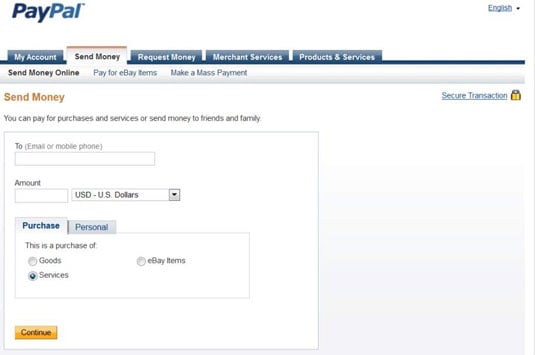
After you sign into your PayPal account and click the Send Money tab, you can send money from PayPal in the following ways:
-
Paying for eBay items: When you buy an eBay item on eBay, you need to pay through the eBay Checkout system.
-
Goods (other): By clicking this radio button, you can send money to anyone in the world for goods purchased anywhere other than eBay.
-
Services: You can send payment for a service performed for you or your business, such as web design, bookkeeping, psychic readings — your imagination can get carried away here.
-
Personal: Use this when you need to send money to your kid in college or pay back your roommate for saving you from great embarrassment when you left your wallet at home on a double date.
Disadvantages of PayPal
- You lose your Section 75 rights. …
- PayPal charges you to receive money. …
- PayPal often freezes a user’s account. …
- PayPal may hold on to your money.
Advantages of Paypal
- Credit card security. …
- Flexibility. …
- Send money. …
- The iPhone App. …
- Online Auctions. …
- Cost. …
- Discounts.
How to Create a PayPal account
1. In your computer’s internet browser, navigate to https://www.paypal.com
2. In the upper right-hand corner of the screen, click “Sign up.”
3. On the following screen, choose whether you’re setting up a business or personal account. If you’re simply using this to buy and sell on eBay for instance, or to send money to a family member or friend, you’ll want to choose “personal” here. Click “Next.”
4. On the next page, you’ll be asked to enter your legal first and last name and your email address as well as to create and confirm a password. When finished, click “Next.”
Next, you’ll need to enter your mailing address as well as your phone number. When you’ve completed this information, which is mandatory, click “Agree and create account” and your PayPal account will be created.
How to add a bank account or credit card to your PayPal account
In order to make use of PayPal’s ability to send and receive money, you’ll need to connect a bank account and/or credit card to your account. To do so, log into your account and then follow these directions.
1. On the summary screen, click the “Wallet” option in the menu bar running along the top of the screen.
2. On the menu running down the left side of the screen, click the “Link a credit or debit card” if that’s what you’d like to use with your account. Alternately, if you want to connect your bank account itself, click on the “Link a bank account option.” Note that it may be worthwhile to do both to create a source of backup funding in future.
3. Enter the card or bank information you wish to link to your PayPal account and click “Link card” for debit cards or “Link bank account” if you’re using that option.
Note that if you’re adding a bank account, it will take two to three days for the process to complete as PayPal will deposit small amounts into your account that you will have to enter via the PayPal website to confirm you own the account.
Conclusion
Since PayPal accounts connects directly to a bank account, buyers can pay for online purchases even if they do not own a credit card. Using PayPal may increase financial security for buyers since the seller does not receive bank account or credit card numbers, only the PayPal account number.
And that makes Paypal a good option to choose when sending or receiving money across the globe, some bloggers and freelancers use Paypal as there Payment Method because it’s save and secured.

